GSRTC (Gujarat State Road Transport Corporation) has been a lifeline for intra- and inter-city travel in Gujarat. In 2025, its digital transformation has made bus booking faster, easier, and way more reliable. Whether you’re commuting for work or planning a weekend getaway, knowing how to book GSRTC tickets online can save time, effort, and a ton of stress.
Let’s walk you through everything you need – step by step.
What is GSRTC?
GSRTC is a government-operated transport service in Gujarat, established in 1960. With a fleet of over 8,700 buses, it connects almost every part of the state—and beyond.
Types of Bus Services Offered
- Express
- Gurjarnagri
- Sleeper Coach
- Volvo AC & Non-AC
- Intercity & Luxury Coaches
Benefits of Choosing GSRTC
- Budget-friendly
- On-time service
- Clean and well-maintained buses
- Reliable driver network
Platforms for Booking GSRTC Tickets
Official GSRTC Website
The primary platform with updated schedules and availability:
https://www.gsrtc.in
GSRTC Mobile App
GSRTC’s Android & iOS apps are easy to use and very user-friendly.
Third-Party Travel Websites
- RedBus
- MakeMyTrip
- Paytm Travel
(NOTE: Service charges may apply.)
Step-by-Step Guide to Book on the GSRTC Website
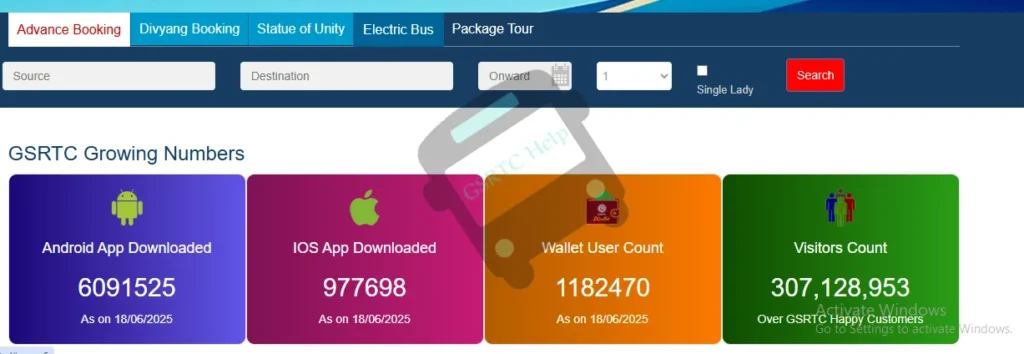
Step 1 – Visit the GSRTC Portal
Head over to www.gsrtc.in and click on ‘Online Booking’.
Step 2 – Select Your Route and Date
Enter:
- From City
- To City
- Date of Journey
Click ‘Search Buses’.
Step 3 – Choose Your Bus Type and Timing
You’ll see a list of available buses. Use filters like:
- AC/Non-AC
- Sleeper/Seater
- Departure Time
Step 4 – Enter Passenger Details
Fill in:
- Name
- Age
- Gender
- Mobile Number
- Email (optional)
Step 5 – Make Payment
Choose your payment method. Enter your details securely and complete the transaction.
Step 6 – Receive Confirmation and Ticket
Once payment is successful, your ticket will:
- Show on the screen
- Be sent to your email/SMS
- Be downloadable as PDF
Booking Through the GSRTC App
How to Download and Install
- Android: Google Play Store
- iPhone: Apple App Store
Search for “GSRTC Official App”, download, and install.
How the App Interface Works
It’s clean and simple:
- Menu-driven options
- Booking, cancellation, and profile features
Booking Flow via the App
Exactly same as website:
- Choose destination/date
- Select bus
- Enter details
- Pay
- Receive e-ticket instantly
How to Cancel or Modify a Ticket
GSRTC Cancellation Policy
- 100% refund if canceled before 24 hrs
- 50% refund if canceled 12–24 hrs before departure
- No refund within 12 hrs
Steps to Cancel or Reschedule Online
- Login to your GSRTC account
- Go to My Bookings
- Click on Cancel/Modify Ticket
- Follow prompts
Refund Process
Refunds usually reflect within 7 working days.
Checking Bus Availability and Seat Layout
Real-Time Availability
You can view:
- Seat status
- Remaining tickets
- Time until departure
Choosing Your Favorite Seat
Click on the seat layout and tap on any available (green) seat to reserve it.
GSRTC Account Benefits
Why Create an Account?
- Fast checkouts
- Booking history
- Travel alerts
Loyalty Points, Offers, and Saved Preferences
GSRTC sometimes offers:
- Cashback
- Discounts on return bookings
- App-exclusive deals
Offline Assistance Options
Customer Care Numbers
Dial 1800-233-666666 or visit any depot office.
Physical Ticket Counters Still Available
Yes, you can still walk in and book over the counter—especially for rural routes.
Tips for a Smooth GSRTC Journey
Travel Prep Checklist
- Carry a power bank
- Water bottle
- Photo ID
- Ticket printout or QR screenshot
Safety & Etiquette on GSRTC Buses
- Be on time
- Don’t play loud music
- Respect fellow passengers
GSRTC vs Other Transport Options
Price Comparison
GSRTC remains one of the most affordable options for intercity travel.
Comfort and Timeliness
With Volvo and AC buses, comfort is now top-tier. And most buses leave on time.
Latest Features in GSRTC Booking (2025 Edition)
QR Code Tickets
No printouts needed! Just scan your mobile QR code.
Live Bus Tracking
Track your bus’s exact location using the app.
WhatsApp Ticket Alerts
Get your ticket and alerts straight on WhatsApp.
Common Issues & How to Fix Them
Payment Failures
- Retry with a different method
- Avoid peak hours
Booking Not Confirmed
- Check spam/junk folder
- Use ‘My Bookings’ to verify
App or Website Errors
- Clear cache
- Try using a different device/browser
Conclusion
Booking GSRTC tickets online in 2025 has become super simple, fast, and secure. Whether you’re on a laptop or just your phone, all you need is a few minutes—and you’re good to go. So, skip the queues and plan your next trip hassle-free with GSRTC’s smart online booking system.
FAQs
Q1. Is it safe to pay online on the GSRTC website?
Yes, GSRTC uses secure payment gateways with SSL encryption.
Q2. Can I change the travel date after booking?
You can cancel and rebook with a new date, but direct modifications are limited.
Q3. What should I do if I don’t receive a ticket?
Check your spam folder or log in to the GSRTC site/app to retrieve your booking.
Q4. Can I book GSRTC tickets for others?
Yes, just enter their details correctly during the booking process.
Q5. Are children charged full fare?
Children above 5 years usually need a full ticket. Infants may travel free (no separate seat).